
Accounting for ecommerce has become increasingly complex. Businesses are frequently selling online and in physical retail locations, offering several different payment methods, accepting multiple currencies, and adding third-party applications to power return services, gift cards, and loyalty programs. This is in addition to the sheer volume of transactions that may get processed on a daily or weekly basis.
In its simplest form, the business sells a good or service and you want to confirm the payment in the bank account. This process maintains the integrity of key financial figures and ensures thereâs no unexpected cash loss occurring.
Orders and refunds are flowing into NetSuite but thereâs not an easy way to match the cash sale (or customer deposit) to a payout in the bank account. The challenge comes from both the complexity and volume of transactions for a typical ecommerce merchant. Â
Blue Onion leverages proprietary algorithms to automatically match each cash sale to a bank settlement, creating an order audit trail and automating the order-to-cash reconciliation process for each transaction.
Eliminate the time-consuming task of manually applying cash settlements to orders. Blue Onion automates the process so you can simply click âapprove.â
Connect to the source data for your orders and payments, which allows us to independently verify your NetSuite order data and identify discrepancies or missing transactions.
Blue Onion offers a breadth of payment processor integrations (20+ and growing) so you can easily reconcile new payment methods without additional cost.
Before beginning the process of reconciliation Blue Onion verifies the order dataset in NetSuite and identifies discrepancies for easy investigation. Blue Onion connects to the order and payment source data, which uniquely allows us to run a reconciliation between your NetSuite orders and the already reconciled Blue Onion data.
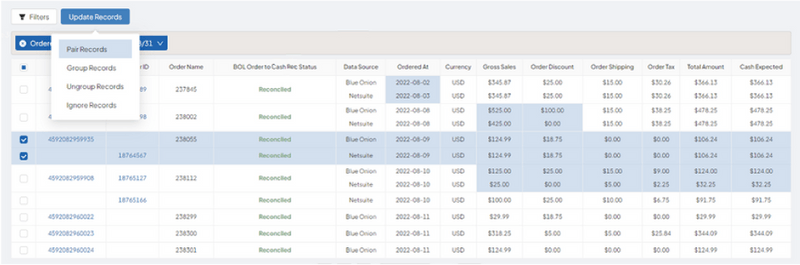
Easily see bank account settlements reconciled to the payment processor detail in Blue Onion, which has been reconciled to your NetSuite transactions. You can then select the reconciled bank settlements that you would like to import into NetSuite, which generates a detailed journal entry that includes originating order and cash sale information along with transaction and payout-level fees.

The Blue Onion entries clear out the holding account with transaction-level detail. In the bank account detail, youâll now be able to see account transactions that match to cash settlements in the bank account. Run the reconciliation rules within NetSuite and the settlements are automatically matched and ready for your review.
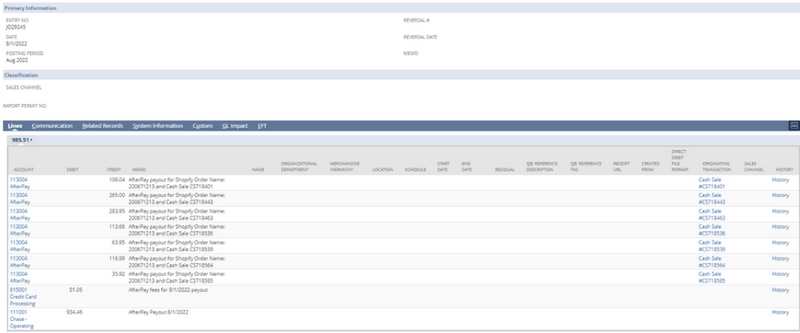
Easily map payments, orders, transactions, and payout fees to your custom Chart of Accounts.

â
While we are a team of former accountants, we are not in the business of providing professional services. The information presented is for informational purposes only and is not intended to be a substitute for professional accounting, tax, or legal advice. We recommend that you consult with a qualified accountant, tax advisor, or lawyer who is familiar with the specific needs and nuances of your business.
February 9, 2026
~5 minutes
TikTok Shop Integration for Accurate Ecommerce Accounting & Reconciliation
Automate TikTok Shop accounting with Blue Onionâs integration. Reconcile payouts, fees, refunds, and orders with full financial clarity.
February 9, 2026
~5 minutes
TikTok Shop Integration for Accurate Ecommerce Accounting & Reconciliation


Automate TikTok Shop accounting with Blue Onionâs integration. Reconcile payouts, fees, refunds, and orders with full financial clarity.
February 9, 2026
~5 minutes
TikTok Shop Integration for Accurate Ecommerce Accounting & Reconciliation


Automate TikTok Shop accounting with Blue Onionâs integration. Reconcile payouts, fees, refunds, and orders with full financial clarity.
February 9, 2026
~5 minutes
TikTok Shop Integration for Accurate Ecommerce Accounting & Reconciliation
Automate TikTok Shop accounting with Blue Onionâs integration. Reconcile payouts, fees, refunds, and orders with full financial clarity.
January 21, 2026
~8 minutes
5 Questions Every CFO Gets Daily (And How Customer Intelligence Answers Them)
When your team can answer their own questions about LTV, retention, and product performance, you are free to focus on the high-level analysis that actually moves the needle. Let Blue Onion help.
January 21, 2026
~8 minutes
5 Questions Every CFO Gets Daily (And How Customer Intelligence Answers Them)
.png)
.png)
When your team can answer their own questions about LTV, retention, and product performance, you are free to focus on the high-level analysis that actually moves the needle. Let Blue Onion help.
January 21, 2026
~8 minutes
5 Questions Every CFO Gets Daily (And How Customer Intelligence Answers Them)
.png)
.png)
When your team can answer their own questions about LTV, retention, and product performance, you are free to focus on the high-level analysis that actually moves the needle. Let Blue Onion help.
January 21, 2026
~8 minutes
5 Questions Every CFO Gets Daily (And How Customer Intelligence Answers Them)
When your team can answer their own questions about LTV, retention, and product performance, you are free to focus on the high-level analysis that actually moves the needle. Let Blue Onion help.
January 21, 2026
~8 minutes
5 Questions Every CFO Gets Daily (And How Customer Intelligence Answers Them)
When your team can answer their own questions about LTV, retention, and product performance, you are free to focus on the high-level analysis that actually moves the needle. Let Blue Onion help.
January 21, 2026
~8 minutes
5 Questions Every CFO Gets Daily (And How Customer Intelligence Answers Them)
When your team can answer their own questions about LTV, retention, and product performance, you are free to focus on the high-level analysis that actually moves the needle. Let Blue Onion help.
January 16, 2026
~2 minutes
Blue Onion Unveils Product Feature to Combat Data Drift
If youâve never heard of "data drift," youâre not alone. Most teams donât realize Amazon data isnât static. Watch this short clip where Blue Onion breaks down whatâs really happening behind the scenes and how Blue Onion helps you stay in control of your numbers.
January 16, 2026
~2 minutes
Blue Onion Unveils Product Feature to Combat Data Drift


If youâve never heard of "data drift," youâre not alone. Most teams donât realize Amazon data isnât static. Watch this short clip where Blue Onion breaks down whatâs really happening behind the scenes and how Blue Onion helps you stay in control of your numbers.
January 16, 2026
~2 minutes
Blue Onion Unveils Product Feature to Combat Data Drift


If youâve never heard of "data drift," youâre not alone. Most teams donât realize Amazon data isnât static. Watch this short clip where Blue Onion breaks down whatâs really happening behind the scenes and how Blue Onion helps you stay in control of your numbers.
January 16, 2026
~2 minutes
Blue Onion Unveils Product Feature to Combat Data Drift
If youâve never heard of "data drift," youâre not alone. Most teams donât realize Amazon data isnât static. Watch this short clip where Blue Onion breaks down whatâs really happening behind the scenes and how Blue Onion helps you stay in control of your numbers.
January 16, 2026
~2 minutes
Blue Onion Unveils Product Feature to Combat Data Drift
If youâve never heard of "data drift," youâre not alone. Most teams donât realize Amazon data isnât static. Watch this short clip where Blue Onion breaks down whatâs really happening behind the scenes and how Blue Onion helps you stay in control of your numbers.
January 16, 2026
~2 minutes
Blue Onion Unveils Product Feature to Combat Data Drift
If youâve never heard of "data drift," youâre not alone. Most teams donât realize Amazon data isnât static. Watch this short clip where Blue Onion breaks down whatâs really happening behind the scenes and how Blue Onion helps you stay in control of your numbers.

Accounting for ecommerce has become increasingly complex. Businesses are frequently selling online and in physical retail locations, offering several different payment methods, accepting multiple currencies, and adding third-party applications to power return services, gift cards, and loyalty programs. This is in addition to the sheer volume of transactions that may get processed on a daily or weekly basis.
In its simplest form, the business sells a good or service and you want to confirm the payment in the bank account. This process maintains the integrity of key financial figures and ensures thereâs no unexpected cash loss occurring.
Orders and refunds are flowing into NetSuite but thereâs not an easy way to match the cash sale (or customer deposit) to a payout in the bank account. The challenge comes from both the complexity and volume of transactions for a typical ecommerce merchant. Â
Blue Onion leverages proprietary algorithms to automatically match each cash sale to a bank settlement, creating an order audit trail and automating the order-to-cash reconciliation process for each transaction.
Eliminate the time-consuming task of manually applying cash settlements to orders. Blue Onion automates the process so you can simply click âapprove.â
Connect to the source data for your orders and payments, which allows us to independently verify your NetSuite order data and identify discrepancies or missing transactions.
Blue Onion offers a breadth of payment processor integrations (20+ and growing) so you can easily reconcile new payment methods without additional cost.
Before beginning the process of reconciliation Blue Onion verifies the order dataset in NetSuite and identifies discrepancies for easy investigation. Blue Onion connects to the order and payment source data, which uniquely allows us to run a reconciliation between your NetSuite orders and the already reconciled Blue Onion data.

Easily see bank account settlements reconciled to the payment processor detail in Blue Onion, which has been reconciled to your NetSuite transactions. You can then select the reconciled bank settlements that you would like to import into NetSuite, which generates a detailed journal entry that includes originating order and cash sale information along with transaction and payout-level fees.

The Blue Onion entries clear out the holding account with transaction-level detail. In the bank account detail, youâll now be able to see account transactions that match to cash settlements in the bank account. Run the reconciliation rules within NetSuite and the settlements are automatically matched and ready for your review.

Easily map payments, orders, transactions, and payout fees to your custom Chart of Accounts.

â
While we are a team of former accountants, we are not in the business of providing professional services. The information presented is for informational purposes only and is not intended to be a substitute for professional accounting, tax, or legal advice. We recommend that you consult with a qualified accountant, tax advisor, or lawyer who is familiar with the specific needs and nuances of your business.